Real Estate Social Media Posts: Every Post Type Mapped to a Stage of the Sale
Real estate social media posts mapped to each stage of a sale: coming soon, just listed, open house, under contract and just sold, with caption frames.
By Realtor Marketing Kit by Cosmo Suite · Editorial policy
Published · 9 min read
It's Thursday, the open house is Saturday, and you have no post, so you open Canva, search "open house", scroll past 400 designs and lose forty minutes choosing one, before you even start on the caption.
That is the usual problem with real estate social media posts. What's missing is an order: what to post first, what comes next and what to say when the listing goes under contract.
Most lists of post ideas sort posts by topic, but a sale does not move by topic. This guide sorts them by stage instead, giving each stage the post types that fit it, a caption frame you can copy and a recommended time to publish.
The Short Version
- Tie every post to a stage of the sale: coming soon, live, under contract, sold, or between listings.
- One listing needs about seven posts across its life. Plan them when you take the listing, not on Thursday afternoon.
- Between listings, three always-on post types keep the account active and visible: market update, tip and Hello Neighbor.
- Keep every claim true and every post fair-housing safe. Your broker has the final word.
Posts Follow the Sale, Not the Calendar
Open any "50 post ideas" list and you get a pile of quotes, memes, tips and house photographs. Nothing says which one belongs on your page today, so real estate agents post whatever they can find and the account ends up looking random.
A listing already gives you a calendar, and a stage-based posting plan is that calendar with a post attached to each date. It starts when you win the listing and ends when the keys change hands. Every stage in between has one thing the audience wants to know, and one post type that answers it for them.
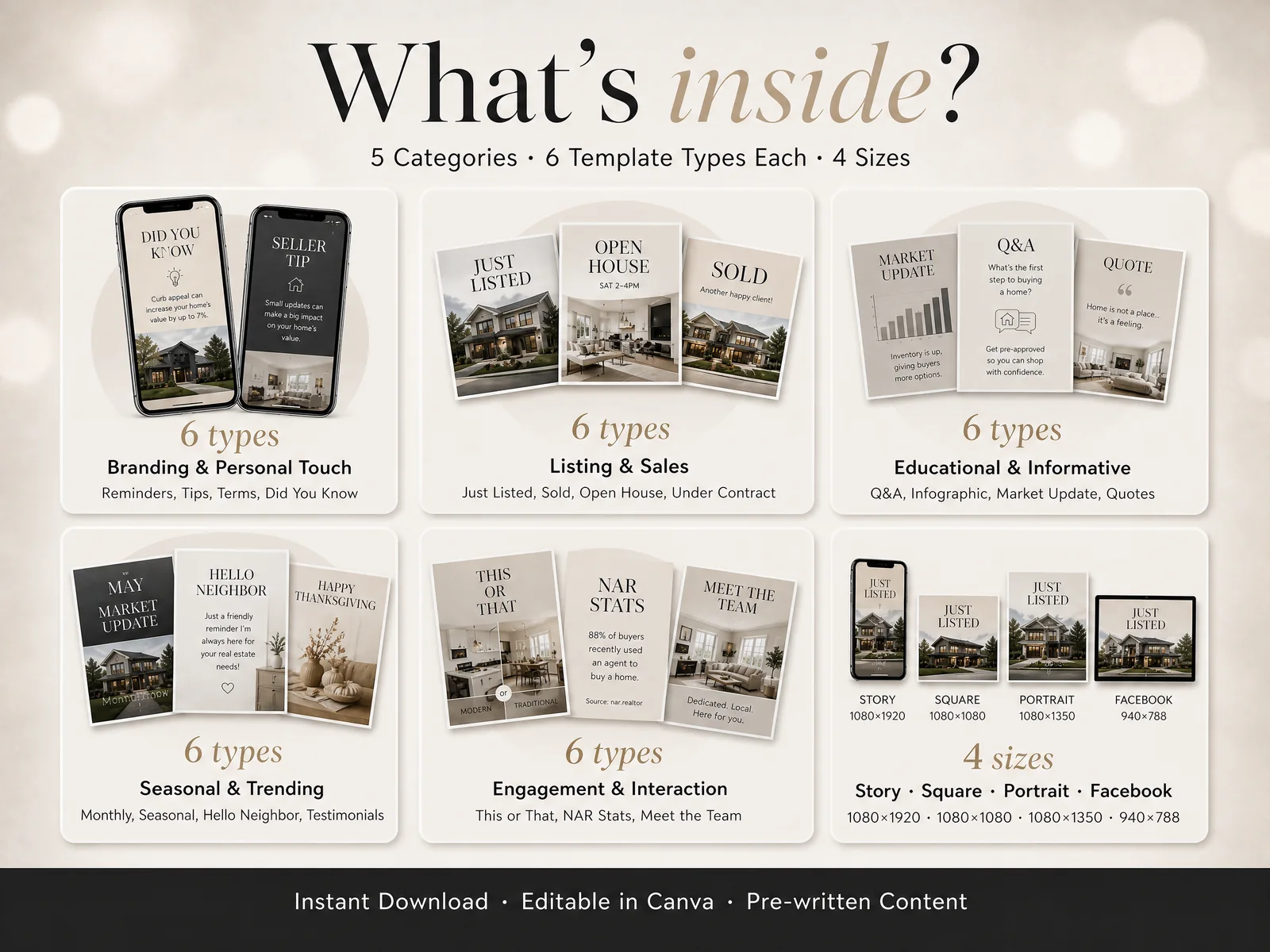
The kit's own grouping follows the same logic. Its "What's Inside" page sorts the post designs into 5 categories of 6 types each, shown in 4 sizes: Story (1080×1920), Square (1080×1080), Portrait (1080×1350) and Facebook (940×788). That gives 30 post types. Ready-made real estate social media post templates are only useful if you know which of the 30 to pick, and that is what the rest of this guide sorts out.
Every Post Type by Stage of the Sale
[Original data] Here is the whole map first, then each stage in detail. The right column uses the kit's own type names.
| Stage | The question the audience has | Post to publish | Kit type |
|---|---|---|---|
| Before the listing is live | "Is anything coming up near me?" | Coming soon teaser | Coming Soon |
| Day one on the market | "What is it and what does it cost?" | Just listed, then a photograph set | Just Listed, Photo Gallery |
| Weekend of the open house | "When can I walk through?" | Invite and day-of reminder | Open House |
| Offer accepted | "Did it sell?" | Under contract update | Under Contract |
| Closing | "What happened?" | Sold thank-you | Just Sold |
| Between listings | "Does this agent know my area?" | Market update, tip, neighbor note | Market Update, Seller Tip, Buyer Tip, Hello Neighbor |
Notice how little of the table is "ideas", because most rows are a fixed announcement with a fixed job. On Thursday you fill in a known post with this week's photograph and address.
The creative work goes into the caption and the photograph choice. The layout can be settled once.
Before the Listing Goes Live
The quiet stage is the one agents skip, even though a short post here earns the most, because the people who follow you hear about the listing before everyone else does.
Coming Soon: Tease Without Overpromising
A coming soon post is a teaser that names the neighborhood and the type of home, shows one exterior or detail photograph and gives no address. Frame: "Coming soon in [neighborhood]: a [bed]-bedroom with [one real feature]. Message me for early details."
Say only what is true on the day you post. NAR's Code of Ethics, Article 12 asks members to be honest and truthful and to "present a true picture in their advertising, marketing, and other representations," so skip "won't last" unless you can back it.
When to post: once, 3 to 7 days before the listing goes live, if your broker and MLS rules allow pre-marketing.
Q&A and Myth vs Fact: Answer What Sellers Ask
Seller prospects ask the same questions at every kitchen table. A Q&A post can answer one of them in two lines, while a Myth vs Fact post sets a common belief next to its correction. Both work best when the answer is local and checkable, such as how showings work in your market.
When to post: weekly while you are looking for the next listing.
While the Listing Is Live
This stage needs the most posts, because the audience is largest while the listing is new and every day on the market is a day the clock is running.
Just Listed: One Strong Photo and Three Facts
A just listed post shows the best exterior or living room photograph, then the price, bed and bath count and one standout feature. Frame: "Just listed: [address area], [beds] bed, [baths] bath, [feature]. Open house [day]. Details in my bio."
Put your firm name on the image or in the caption. Standard of Practice 12-5 asks firms to disclose their name in a reasonable and readily apparent manner.
When to post: the morning the listing goes live, as a feed post, with the same design resized for Stories.
Photo Gallery: Let the Carousel Do the Work
A carousel of 6 to 9 photographs in order (front, kitchen, living, primary bedroom, outdoor) lets people browse without leaving the app. The first slide carries the title and the last carries your contact line.
When to post: two to three days after just listed, when the first post has dropped down the feed.
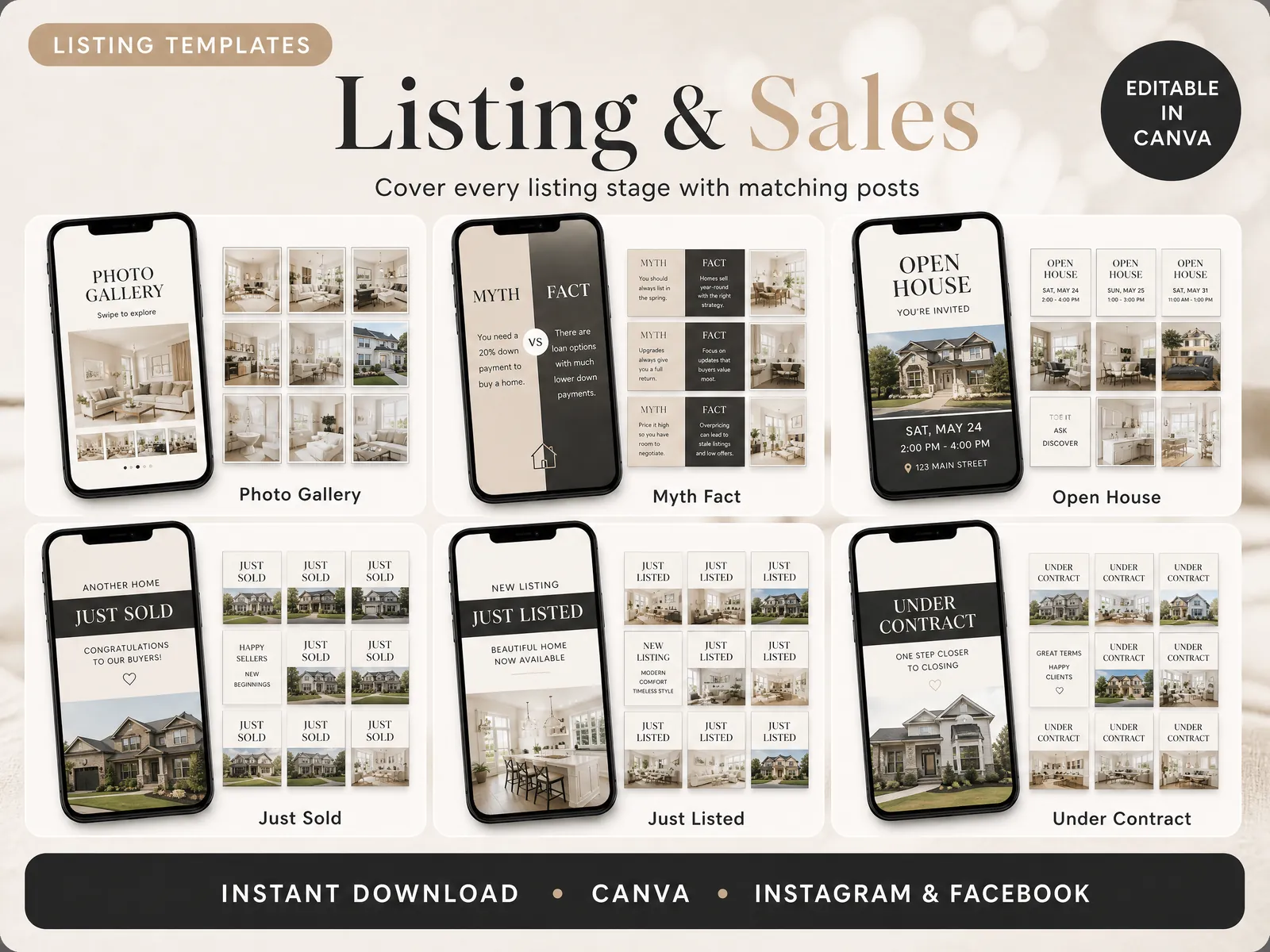
Open House: One Invite, One Reminder
Post the invite three days ahead and a short reminder the morning of. Use the same design and change only the line at the bottom. Frame: "Open house this Saturday, 2 to 4 pm, [address]. Come by, I'll have the numbers."
When to post: three days before, and 8 am on the day.
Under Contract and Sold
Most agents remember to post just sold and forget the middle, even though the middle is where a listing keeps people watching.
Under Contract: Keep the Listing in View
An under contract post tells followers the home has an accepted offer and thanks the sellers. Frame: "Under contract in [number] days. Thank you to my sellers for trusting me with their home." Use only what you can state, since the number of days is your own record.
When to post: the day the offer is accepted, once your client agrees.
Just Sold: Thank the Client, Not Yourself
A just sold post works best when the client is the subject. Ask first, use their first name or "my buyers", and keep the price out unless it is public record and your client is comfortable.
When to post: closing day or the day after.
The Posts That Run Between Listings
A listing lasts weeks while your account lasts years, so between listings you need three post types that keep the page alive.
Market update. One number, one sentence: "Median days on market in [area] this month: [your MLS figure]." Pull the figure from your MLS, and name the source.
Tip. A Seller Tip or Buyer Tip is one idea in under 25 words, such as "Pre-approval first, then the showings."
Hello Neighbor. A short note aimed at one area. It is local and low pressure, which makes it a good post for a farm area.
Add one personal introduction post every month, such as Meet the Team or Who I Am, so people can put a face to the name.

One Listing, Seven Posts: A Worked Plan
Here is how the stages become a plan. This is a planning example, not a result, and the dates are relative to the day the listing goes live (day 0).
| Day | Post | Kit type |
|---|---|---|
| -5 | Coming soon teaser | Coming Soon |
| 0 | Just listed, feed and Story | Just Listed |
| 2 | Photo carousel | Photo Gallery |
| 4 | Open house invite | Open House |
| 7 | Open house reminder (8 am) | Open House |
| 12 | Under contract | Under Contract |
| 40 | Just sold | Just Sold |
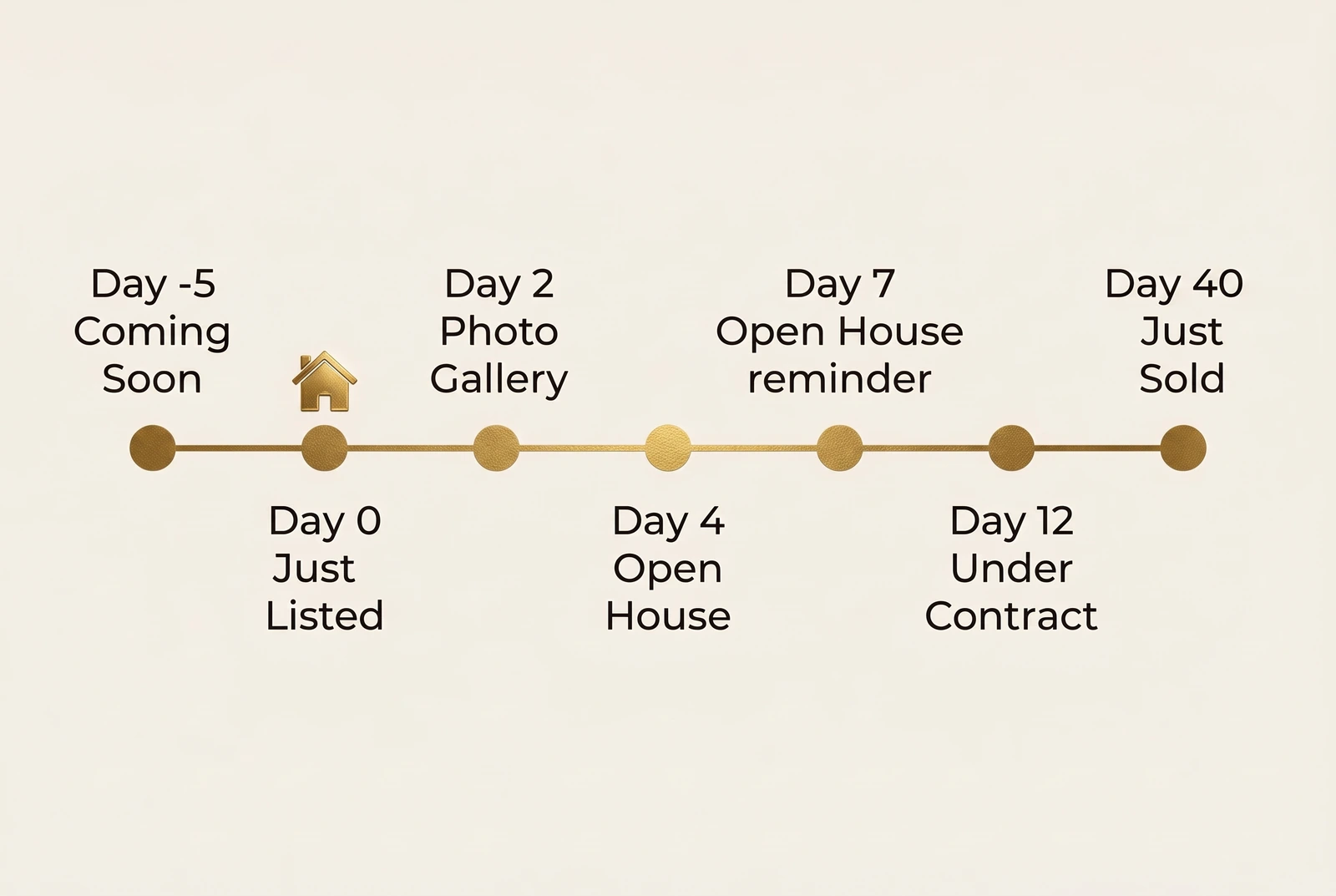
That makes seven posts, each built from the same kind of design with new text and a new photograph, and if you take two listings a month, that adds up to about 14 listing posts. Add one market update, two tips and one Hello Neighbor note per month and you land near 18 posts a month, or four to five a week.
[Unique insight] The arithmetic points to the constraint: eighteen posts a month take hours, and a designed set of templates is what cuts them.
What Actually Keeps You Posting
Three habits matter more than any one post.
Decide the seven posts at listing time. Put them on your calendar the same day you sign the listing agreement. The decision is done, and the week of the open house stops being an emergency.
Reuse the layout and change only the words. The fastest posts are the ones you have made before. A reusable design makes a week of posts a 20-minute job instead of a two-hour one, because you only edit text and photographs. A set of pre-written, editable real estate post templates is built for exactly that.
Check each post against fair housing before it goes out. NAR's fair housing guidance says to focus "on the property and its amenities, not on your 'ideal' buyer," and to include the phrase "Equal Housing Opportunity" or the logo. Words like "perfect for young families" describe a buyer instead of the property, so describe the property itself.
Why Trust This Article
The Cosmo Suite team wrote this guide, and we make Realtor Marketing Kit, shown in the screenshots. Our methodology for the plan above is a count: we listed the kit's post types from its What's Inside page and assigned each one to the stage where it fits. The post types and sizes come from the kit's own What's Inside page. The compliance points come from NAR's Code of Ethics and its fair housing page, both checked on 8 October 2026. The seven-post plan is our own planning example, not a measured result. Rules differ by state, MLS and brokerage, so check yours with your broker before you publish. You can read about us and our editorial policy.
Where Realtor Marketing Kit Fits
The hard part of this plan is not the order of the posts but making seven listing posts and a monthly set of always-on posts look like one brand, quickly, every time.
Realtor Marketing Kit is a set of 25 editable Canva template sets for real estate agents, sold as an instant download. It includes 60 Just Listed, Sold and Open House posts, Facebook listing posts, market updates, quotes, 100+ infographics, monthly and seasonal posts, 40 animated stories, a weekly content calendar and an email template kit. Every template opens in a free Canva account, so you swap in your photograph, address and colours without a designer.
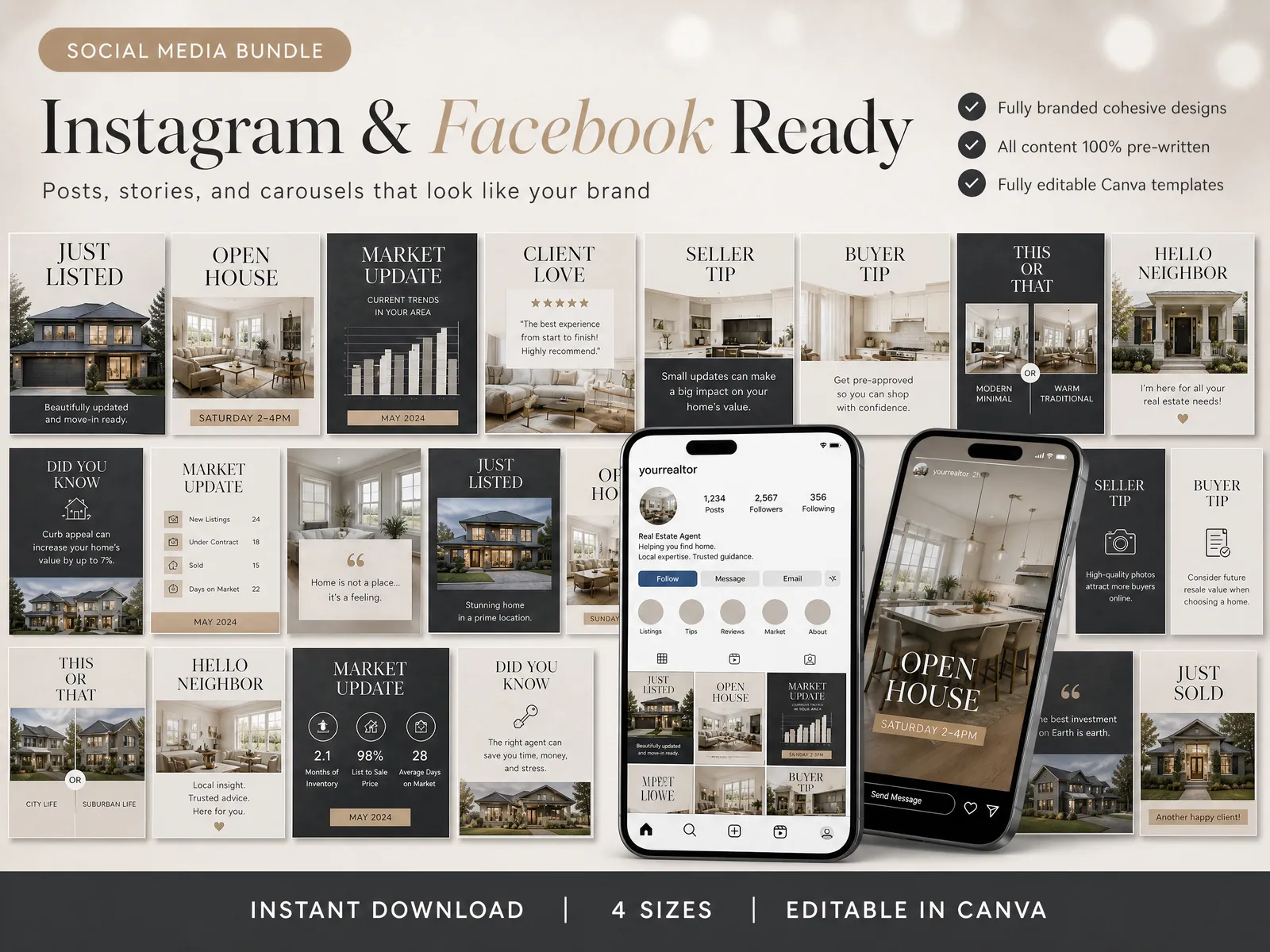
It does not post for you, schedule posts or find clients. It gives you the designs and the wording, and you do the publishing. If you want the stage-by-stage map above with the designs already made, see the Realtor Marketing Kit.
Frequently asked questions
How many real estate social media posts should I publish a week?
Start with three, and add a fourth when you have a live listing. One listing post, one tip or market post and one personal post is a rhythm you can keep for a year. A schedule you drop in week three does less than a small one you hold.
What do I post when I have no listings?
Post the always-on types: a market update, a buyer or seller tip, a Hello Neighbor note and one post that introduces you. These need no listing photo. They keep your page active, so the next just listed post lands on an account people already follow.
Do I need Canva Pro to edit these posts?
No. Every template in Realtor Marketing Kit opens in a free Canva account. Canva Pro adds a few conveniences, but nothing in the kit requires it. You swap the photo, address and brand colours, and the layout stays intact.
Should I post the same design on Instagram and Facebook?
You can, but check the size first. Instagram feeds use square or portrait shapes and Stories use a tall one, while Facebook feeds suit a wider shape. The kit includes four sizes of each design, so one edit gives you a version for each place.
What rules apply to a just listed or just sold post?
Your state, your MLS and your broker set the exact rules, so ask your broker first. Two shared ones: NAR's Code of Ethics asks for honest advertising and a visible firm name, and fair housing law covers the words and photos you use.
